MCP Best Practices — The CaSH Model
Update: We have published a draft RFC for the CaSH Model — feedback welcome.
We've started experimenting with MCP servers since Fall 2025: we had built the beginnings of our system of record, and now we needed to get Claude Code interacting with those records. MCP was the obvious choice — it promised a simple and standardized way to expose our data and functions to the model. We jumped in enthusiastically. And almost drowned. MCP at the time was a mess — brittle servers, buggy transports. Even with Claude Code it took us days to make the server connect reliably. This eventually got resolved, but then the real problem hit us: context bloat.
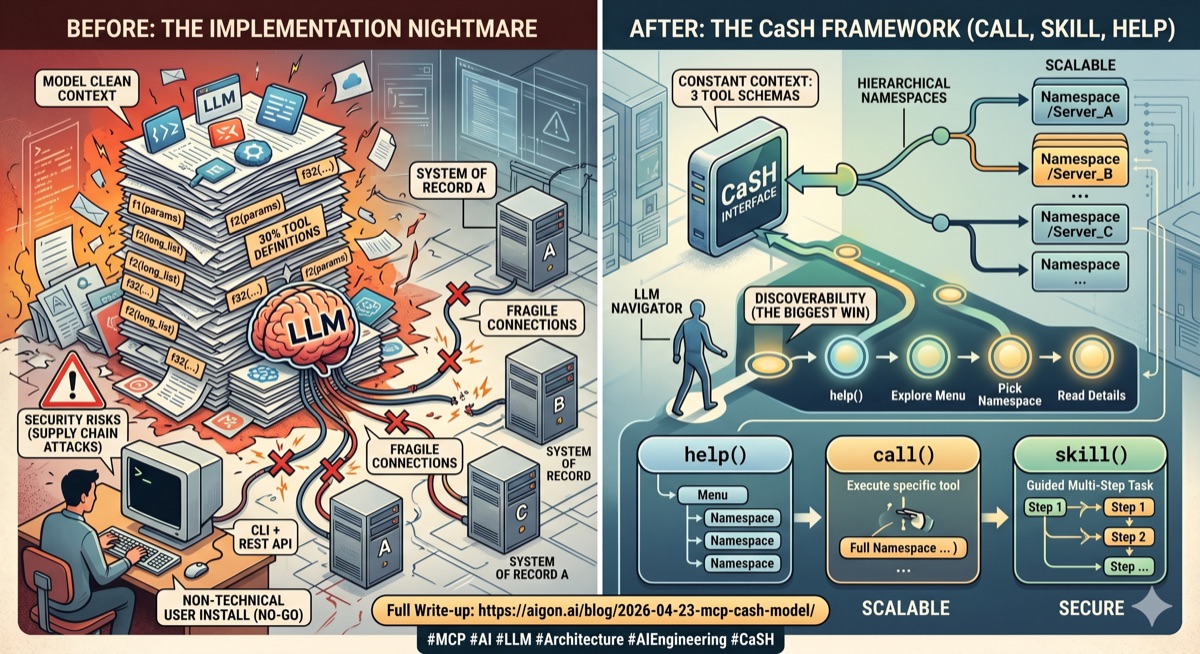
Our system of record is quite complex, and therefore our MCP server needed to expose a large number of functions. And each of those functions needed to expose a massive number of parameters, especially on the query / search side. Of course as everywhere, 80/20 applies — most of the functions were rarely used, and most of the parameters were rarely needed. But rarely is not never, so those functions needed to be there, sitting in the model's context.
It was so bad that at one stage the clean context was 20–30% filled with our MCP tool definitions alone. This was of course not sustainable, and we moved to a CLI + REST API model. This actually worked very well, especially with well designed help texts that allow for progressive disclosure and skills. It is not perfect, but it is working. But this created another problem: we now needed to ship a CLI tool to our users, and they had to use a CLI capable tool like Claude Code. This worked with some early adopters, but clearly this is not sustainable. Normal people don't use Claude Code in the CLI, and even if they did, asking people to install code on their machines just to access your API is really not acceptable from a security design perspective. So CLI + API was good for testing and early adoption, but not for scaling into a non-technical user base.
So, as one does, we kept monitoring the situation. We got better client libraries, and MCPs got more robust over time. Claude Code now offers native SSE support, which is nice. For Claude Desktop and others you still need to install a local proxy. Still not great for non-technical users, and in our view an unnecessary security risk, but we are confident this is transient and that over time all LLMs will support SSE natively.
Some clients — notably Claude Code and Cursor — now support progressive loading of tool definitions: instead of dumping every schema into context, they maintain a search index and fetch details on demand. This is a huge improvement where available — Claude Code reports up to 85% token reduction. But most MCP clients still load everything upfront, and even with progressive loading it is not ideal if you expose hundreds of functions across dozens of servers. Our insight was that the tools themselves should be subject to progressive disclosure, not just the function definitions.
The CaSH Framework
Enter the CaSH framework we developed for our internal use. CaSH stands for Call, Skill, Help, which are the only three functions we expose:
call()calls a functionhelp()progressively discloses helpskill()explains a specific task
Now this is great because we have only three functions per server, down from potentially dozens or even more. We still have a problem though if we want to make many MCP servers available to the model — if we have ten servers, that's still 30 functions. This is where our second design insight came in: hierarchical namespaces. All three functions take a namespace parameter which allows us to aggregate multiple servers into a single interface. The model doesn't need to know how many servers there are — it just calls help() to see what's available, and then call() or skill() to execute. The context cost is constant — three functions — regardless of how many servers we add.
Progressive Disclosure in Practice
We have been road testing this model for a while now — and it is working a charm. The key concern is always whether the model can discover and use the tools effectively, and it really works. Key here is how to exactly structure the progressive disclosure in help(), and what to reveal at each step. What works for us is the following:
help()with no arguments lists all namespaces, with a brief description onlyhelp(namespace)lists all functions in that namespace and/or all sub-namespaces, again with brief descriptions onlyhelp(namespace, function)finally gives the full signature, parameters, and documentation for that function
The important thing is discipline at each level: the top-level listing should be short — namespace name, one line of description, nothing more. The model sees the menu, picks what it needs, and only then pays the context cost for the details. In practice we find that models navigate this very naturally. They call help(), scan the namespaces, pick one, drill in. It mirrors how a developer explores an unfamiliar API — you don't read every man page before you start.
call() is straightforward — you pass the namespace, the function name, and a dict of keyword arguments. The server handles authentication, injects the user context, and returns the result. Dot notation works too: call("pagecapture.search", {"query": "AI"}). There is one practical detail worth mentioning: output size gating. LLM context is precious, and some functions can return very large results. We cap the response at a configurable byte limit, and if a result exceeds it, the server tells the model to either narrow its query or explicitly request a larger response. This prevents a single call from flooding the context with data the model didn't actually need.
skill() was added as a third pillar for complex tasks. It is very similar to /skills in CLIs like Claude Code: those are instructions that explain how to accomplish a specific task, potentially using multiple calls, potentially across multiple namespaces. It is an area worth its own post because skills by design can span namespaces, servers, and even modalities (e.g. calling an MCP function, then asking the model to generate a message, then calling another function). Their progressive disclosure works similarly to help: only the leaves of the skill tree have the full instructions, the inner nodes only have short descriptions of the next level down.
Skills in a way live their life independently of the remainder of the MCP server, and they may well expose their own namespace hierarchy, and this allows for interesting applications, but those are for a future post.
What We Learned
The CaSH model solved our three original problems. We no longer have context bloat — we just have three tool schemas -- constant cost -- regardless of how many namespaces we aggregate. Also, thanks to the new tools, MCPs are much more robust. We use FastMCP with SSE transport, and it mostly just works. And discoverability actually improved, especially with the interplay of skills and help. In the old design where the entire docs were just dumped into the context the LLMs often got confused. What we learned is that LLMs are good at progressive exploration when you give them the right structure. They don't need to see everything upfront, they just need to be given a scaffolding of how to acquire knowledge in a context and token efficient manner.
One idea we are still exploring is that, because CaSH is just a routing layer, it should be possible to aggregate multiple existing MCP servers behind a single CaSH interface without having to touch the component servers at all. But that is for a future post.
If you are building MCP servers and running into similar issues, consider whether your tools really need to be individual MCP functions, or whether they could live behind a CaSH interface with namespaced progressive disclosure. For us, this was the difference between MCP being a nice idea and MCP being something we actually ship. Even internally we have switched back from CLI + API to CaSH MCP for most use cases.
You can try our MCP server yourself — it lives at https://mcp.aigon.ai/mcp/ and set up instructions are in our docs. You will need a free account to get started, and you will want to capture a few pages first so you have some data to interact with.